> ## Documentation Index
> Fetch the complete documentation index at: https://docs.shakesco.com/llms.txt
> Use this file to discover all available pages before exploring further.
# Manage Rewards from the Dashboard
> Edit events, happy hours, daily caps, tiers, cashback, and more without writing code
For the complete documentation index, see [llms.txt](/llms.txt).
## Customer Rewards Dashboard
All your loyalty program settings are manageable from the dashboard at [users.shakesco.com/loyalty-program](https://users.shakesco.com/loyalty-program). No API calls needed.
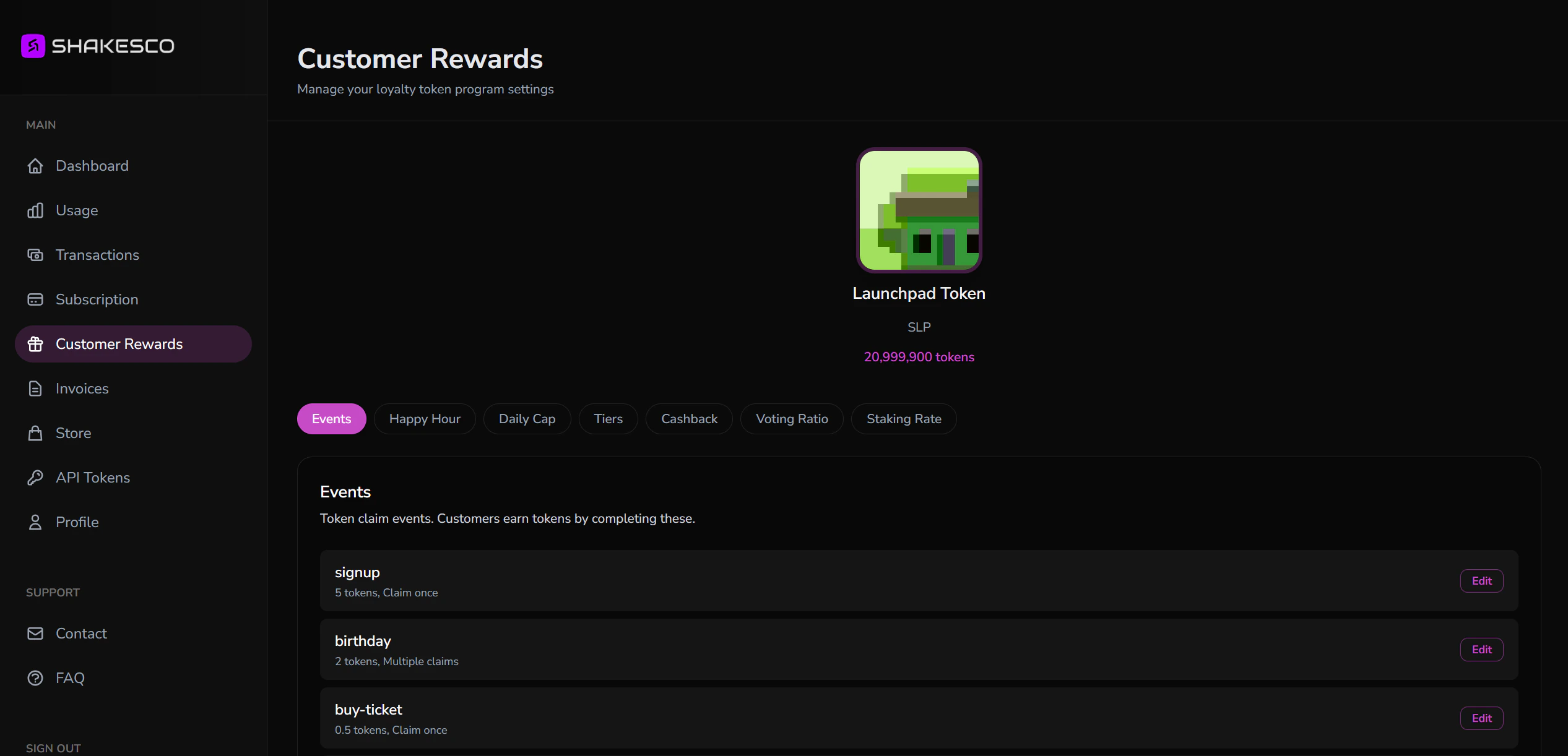 ## What You Can Configure
The dashboard organises settings into tabs. Click **Edit** on any item to update it.
### Events
Events are actions customers complete to earn tokens, for example `signup`, `birthday`, or `buy-ticket`.
Each event has:
* **Token allocation**: how many tokens the customer earns
* **Claim policy**: one-time only, or claimable multiple times
Edit existing events or add new ones. Changes take effect immediately.
### Happy Hour
Run time-limited promotions where customers earn extra tokens. Set a **multiplier** (e.g. 2× = double tokens) and a **duration** in minutes or hours. You can end a happy hour early at any time.
### Daily Cap
Prevent customers from earning too many tokens in a single day. Set a maximum daily amount. Once the cap is hit, the customer cannot earn more until their 24-hour rolling window resets.
Disable the cap at any time to allow unlimited daily earnings.
### Tiers
Configure Bronze, Silver, and Gold tier thresholds. Customers automatically advance through tiers as their token balance grows, unlocking perks you define in your app.
### Cashback
Automatically reward customers when they reach a spending threshold. Set the threshold in any supported currency and the number of tokens awarded.
### Voting Ratio
Define how many tokens equal one vote to enable token-weighted community governance. Set to `0` to disable voting.
### Staking Rate
Configure the base staking rate. Set a base duration (e.g. 1 year) and base reward (e.g. 20%). All stake durations are calculated proportionally from this base.
## Dashboard vs. API
Everything you can do in the dashboard you can also do via the [Tokens API](/api-reference/tokens/overview). Use the dashboard for manual adjustments and the API for automated or programmatic changes.
| Feature | Dashboard | API endpoint |
| ------------ | --------- | ------------------------- |
| Events | ✓ | `POST /set-event-details` |
| Happy Hour | ✓ | `POST /set-happy-hour` |
| Daily Cap | ✓ | `POST /set-daily-cap` |
| Tiers | ✓ | `POST /set-tiers` |
| Cashback | ✓ | `POST /set-cashback` |
| Voting Ratio | ✓ | `POST /set-voting-ratio` |
| Staking Rate | ✓ | `POST /set-staking-rate` |
## Next Steps
Connect your backend to start awarding tokens automatically
Complete endpoint reference
## What You Can Configure
The dashboard organises settings into tabs. Click **Edit** on any item to update it.
### Events
Events are actions customers complete to earn tokens, for example `signup`, `birthday`, or `buy-ticket`.
Each event has:
* **Token allocation**: how many tokens the customer earns
* **Claim policy**: one-time only, or claimable multiple times
Edit existing events or add new ones. Changes take effect immediately.
### Happy Hour
Run time-limited promotions where customers earn extra tokens. Set a **multiplier** (e.g. 2× = double tokens) and a **duration** in minutes or hours. You can end a happy hour early at any time.
### Daily Cap
Prevent customers from earning too many tokens in a single day. Set a maximum daily amount. Once the cap is hit, the customer cannot earn more until their 24-hour rolling window resets.
Disable the cap at any time to allow unlimited daily earnings.
### Tiers
Configure Bronze, Silver, and Gold tier thresholds. Customers automatically advance through tiers as their token balance grows, unlocking perks you define in your app.
### Cashback
Automatically reward customers when they reach a spending threshold. Set the threshold in any supported currency and the number of tokens awarded.
### Voting Ratio
Define how many tokens equal one vote to enable token-weighted community governance. Set to `0` to disable voting.
### Staking Rate
Configure the base staking rate. Set a base duration (e.g. 1 year) and base reward (e.g. 20%). All stake durations are calculated proportionally from this base.
## Dashboard vs. API
Everything you can do in the dashboard you can also do via the [Tokens API](/api-reference/tokens/overview). Use the dashboard for manual adjustments and the API for automated or programmatic changes.
| Feature | Dashboard | API endpoint |
| ------------ | --------- | ------------------------- |
| Events | ✓ | `POST /set-event-details` |
| Happy Hour | ✓ | `POST /set-happy-hour` |
| Daily Cap | ✓ | `POST /set-daily-cap` |
| Tiers | ✓ | `POST /set-tiers` |
| Cashback | ✓ | `POST /set-cashback` |
| Voting Ratio | ✓ | `POST /set-voting-ratio` |
| Staking Rate | ✓ | `POST /set-staking-rate` |
## Next Steps
Connect your backend to start awarding tokens automatically
Complete endpoint reference